product-teamPriya: Notes are ready. Let’s build on them.
smriticalendar
Walk into your next meeting with everything in place.
SmritiOSCalendar
Your week, in view.
MON12
TUE13
WED14
THU15
FRI16
Product sync10:00 – 10:30
Design review14:00 – 14:45
Meeting botYou choose when it joins
One connected workspace. A lot less to juggle.
And the everyday essentials, built right in.
Hindi, English & Hinglish Channels & mentions Live notifications Workspace roles Meet, Zoom & Teams Google sign-in Export to Word, PDF & CSV Record with no bot · Chrome extension Share by link, no login Images in notes & tasks
After the call
The meeting ends. The work is already moving.
Minutes after you hang up, the notes have already gone to the people and tools that need them.
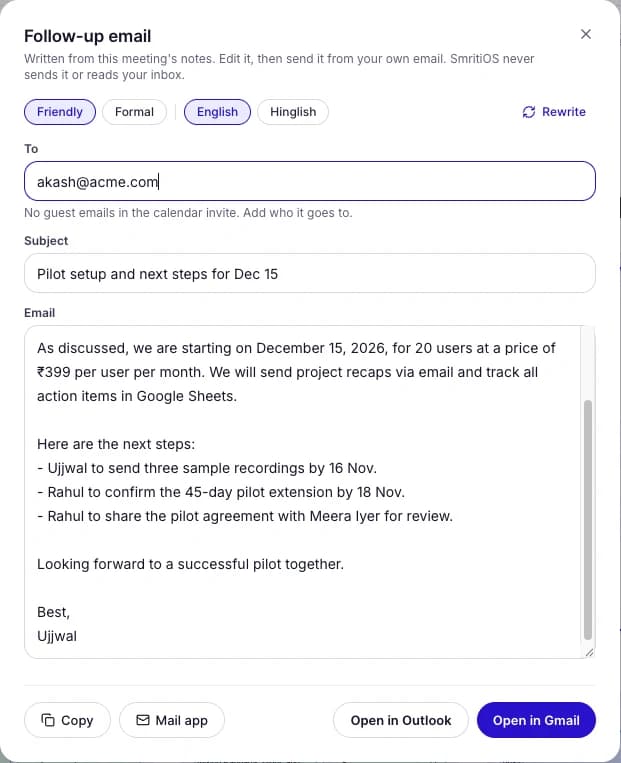
The follow-up email is already written.
Drafted from what was decided and who owes what, in English or Hinglish. Edit it, then send it from your own Gmail or Outlook. SmritiOS never reads your inbox.
Your CRM, updated before you open it.
Notes land on the right contact or deal, and each action item becomes a CRM task with its due date.
Zoho CRM HubSpot Freshsales
RM
Rahul MenonContact · found by email in the invite
Note addedPilot review
Pilot starts 15 December with 20 users. Pricing ₹399 per user.
Send SOW Due 20 Nov
Share pricing sheet Due 18 Nov
Logged by itself after the call
Share the notes. No login needed.
Send a link to your customer or invite people by email. You choose whether they see the notes, the whiteboard or both.
Share this meeting
Only people invitedAnyone with the link
Notes Whiteboard
smritios.com/s/wk3P…Copy link
Opens without an account. Stop sharing any time.
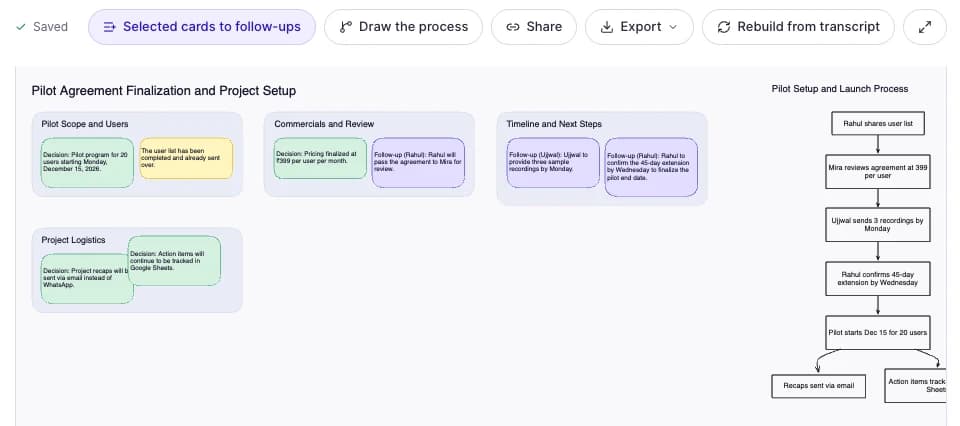
A whiteboard that draws itself.
One click turns the call into a board of decisions, risks and next steps, with a process diagram. Move things around, add your own, export it.
Integrations
Notes go where your team already works.
Connect a tool once. After every meeting SmritiOS sends the notes and action items there, and the meeting page shows you where each one went.
CRM
Zoho CRM HubSpot Freshsales
Tasks and docs
Notion Google Sheets Jira Asana monday.com
Team
Slack Google Calendar
Everything else
{ } WebhooksSend every meeting to Zapier, Make, n8n or your own code.
Your tools0 of 5 done5 of 5 done
Zoho CRMNote and 2 tasks added to Rahul Menon
Waiting Sending Sent
NotionAction items sent to Task List
Waiting Sending Sent
Google SheetsRow added to SmritiOS Meetings
Waiting Sending Sent
SlackSummary posted to #sales
Waiting Sending Sent
{ }
WebhookDelivered to your Make scenario
Waiting Sending Sent
How it works
From setup to results in minutes.
No setup calls or training — your first summary is minutes away.
01
Connect
Paste a Meet, Zoom or Teams link, or upload a recording.
meet.google.com/kvr-pilot SmritiOS joined
02
Capture
The SmritiOS bot joins the call, or our Chrome extension records it with no bot at all.
Recording 04:12
03
Understand
Get a transcript, summary, decisions and action items.
DecisionTask
04
Follow through
Send the follow-up email, update your CRM and track every task.
Email drafted
CRM updated
3 tasks assigned
Chrome extension
Record the call. Skip the bot.
Add the SmritiOS extension and record Google Meet, Zoom and Teams calls straight from your browser. No bot joins, so nobody sees an extra participant. You get the same transcript, summary, decisions and action items.
1
Add it to Chrome
Install SmritiOS Capture from the Chrome Web Store. It takes a few seconds.
2
Connect your account
Open the extension and press Connect. Not signed in? You can sign in right there.
3
Join your meeting
Open Meet, Zoom (web) or Teams (web). A badge shows while it records. Stop when you are done.
Chrome on desktop. Newer extensions can show a “not trusted” notice in Chrome; choose Continue to install. It only runs on meeting pages. Tell everyone on the call that it is being recorded.
meet.google.com/abc-defg-hij
SmritiOS Capture Recording · 12:41
Google Meet Captions on
Recording mic
Stop and process
Weekly product syncSummary, decisions and 5 action items ready
Google Meet, Zoom (web) & Teams (web)
Audio is deleted after transcription
Your mic is off until you switch it on
Built for clarity
See everything that matters. Ignore what doesn't.
SmritiOS turns hours of calls into a clear view of decisions, owners and next steps — so nobody has to rewatch a recording to find out what was agreed.
Search across every meeting in your workspace
Get instant answers with Ask Smriti
Turn conversations into tracked action items
Edit notes like a doc, add tables, export to Word or PDF
Share notes and whiteboards with a link, no login needed
Send notes to your CRM, Slack, Notion and Sheets by themselves
Everything you need to know before getting started.
What is SmritiOS?
SmritiOS is an AI meeting notetaker and memory OS for your team. It records your Google Meet, Zoom and Teams meetings, turns every conversation into searchable memory (what was decided, who owns what, what is still open), then drafts the follow-up email, updates your CRM and tracks every action item. It works in Hindi, English and Hinglish.
Is it really free?
Yes. Every new workspace gets full access for 30 days, with no card needed. After that your meetings and notes stay available to view; paid plans are coming and we’ll tell you before anything changes.
How does SmritiOS join my meetings?
Create a meeting with your Google Meet, Zoom or Teams link and send the SmritiOS bot. It joins like any other participant, and the summary, decisions and action items appear in your workspace after the call. If you would rather not have a bot in the call, use the Chrome extension instead.
Can I upload an existing recording?
Yes. Upload MP4, WebM, MOV, MP3, WAV or M4A files and they’re processed into the same transcript, summary and action items.
Which languages are supported?
English, Hindi and mixed Hindi–English (Hinglish), along with other Indian languages.
Can I edit and export my meeting notes?
Yes. Every summary opens as an editable note: headings, lists, quotes and tables, with your original AI summary kept intact. Export notes to Word, PDF or Markdown, action items to CSV, and transcripts to text or subtitles. You can also import a Word, Markdown or text file into a note, and action items from a CSV.
Can I record without a bot joining the call?
Yes. Install the SmritiOS Capture extension in Chrome and press Connect. Calls you join in Chrome (Google Meet, Zoom web client, Teams web) are then recorded from your browser, and no bot joins them. The bot only goes to meetings you aren’t recording with the extension, and you can switch the bot off completely in Settings. You can also upload a recording after the call.
Is the Chrome extension safe? Why does Chrome show a notice?
The extension only runs on Google Meet, Zoom and Teams pages and records only when you have confirmed that everyone knows. Audio is deleted right after transcription and only the text is kept. Chrome can show a “not trusted” notice for newer extensions; choose Continue to install. Details are in our Privacy Policy.
Does the extension work with the Zoom desktop app?
No. Browsers can only record what runs in a browser tab, so use Zoom’s “Join from your browser”, Google Meet or Teams on the web. For the Zoom desktop app, send the SmritiOS bot or upload the recording afterwards.
Does SmritiOS update my CRM?
Yes. Connect Zoho CRM, HubSpot or Freshsales once. After each meeting the notes are added to the guest’s contact or deal, found by the email in your calendar invite, and action items become CRM tasks with due dates. If the guest isn’t in your CRM yet, pick the record yourself from the meeting page.
Does SmritiOS send emails from my inbox?
No. It writes the follow-up email from the meeting’s notes, in English or Hinglish, and opens it in your own Gmail, Outlook or mail app for you to edit and send. SmritiOS never connects to your inbox and never sends anything for you.
Can I share notes with someone outside my workspace?
Yes. Share a meeting’s notes, its whiteboard or both, either with people you invite by email or with anyone who has the link. They open it without creating an account, and you can stop sharing at any time.
What if my tool isn’t on the list?
Add a webhook. SmritiOS sends each meeting’s summary, decisions and action items to your URL as soon as the notes are ready, so Zapier, Make, n8n or your own code can pass them on to any tool. Every request is signed so you can check it came from SmritiOS.
Does SmritiOS connect to Google Calendar?
Yes. Connect your calendar from Settings or the Calendar page. We only request read-only access, and the bot joins a call only for events you switch on. You can disconnect at any time.
Do I need consent to record a meeting?
Yes. Whether the bot joins as a visible participant or you record with the extension, you are responsible for informing attendees and getting any consent the law requires where they are. The extension asks you to confirm this before it records. See our Terms for details.
Can I cancel anytime?
There is nothing to cancel. You are never charged during the free period, and we won’t charge you for anything without asking first.
Start today
Give every meeting a memory.
Record the call, get the notes, and let the follow-up, the CRM update and the task list take care of themselves.